k3s is Kubernetes packed into one executable of under 100 MB, and you can install it on a single VPS with one command. We ran this whole article on a clean Ubuntu 24.04 with 2 vCPU and 2 GB of RAM: the install took 20 seconds, the node was Ready within a minute, and the finished cluster with two copies of a web server used about 730 MB of RAM and barely touched the CPU. Below is the full path: what gets installed and what the install script does, how to connect from your laptop, how to run a first app and reach it on the server's IP, how to back up, upgrade and remove it. Where we did not test something, we say so.
Why k3s, and what a one-node cluster is
Kubernetes is a system that runs your containers, keeps the right number of copies alive, restarts crashed ones and routes network traffic to them. Regular Kubernetes is made of several programs and is built for several servers. k3s is a lightweight distribution of the same Kubernetes: the same API, the same kubectl commands and manifests, but packed into one file, with an embedded SQLite database instead of the heavy etcd by default. That is why it fits on one small server.
A one-node cluster means the control plane and the workload live on the same machine. You get the full Kubernetes API, but no fault tolerance: if the server goes down, everything goes down. Apps run in pods: a pod is the smallest unit Kubernetes starts, with one or more containers inside. k3s also installs the useful parts for you: CoreDNS (internal DNS), Traefik (an ingress controller that takes outside traffic), metrics-server (the kubectl top command), local-path-provisioner (volumes on the local file system) and the svclb helper that exposes ports.
What a single node is good for, and what it is not
| Good for | Not good for |
|---|---|
| Learning kubectl, manifests and Helm charts on your own machine | A service that must never stop: you have one server, and it is a single point of failure |
| A test or staging environment that mirrors a production layout | A workload that needs more RAM or CPU than one server has |
| A few small services behind one Ingress, with rolling updates of the app itself | "Just run one or two containers": Docker Compose is simpler and uses less memory |
| Helm charts and operators that need the real Kubernetes API | A team where nobody is ready to find out why a pod will not start |
The rule is simple: if you need the Kubernetes API, use k3s. If you just need a couple of containers, Compose is cheaper in memory and easier to run. You can add a second and third server to the same cluster later, but that is a separate topic and we did not test it here.
How many resources you need
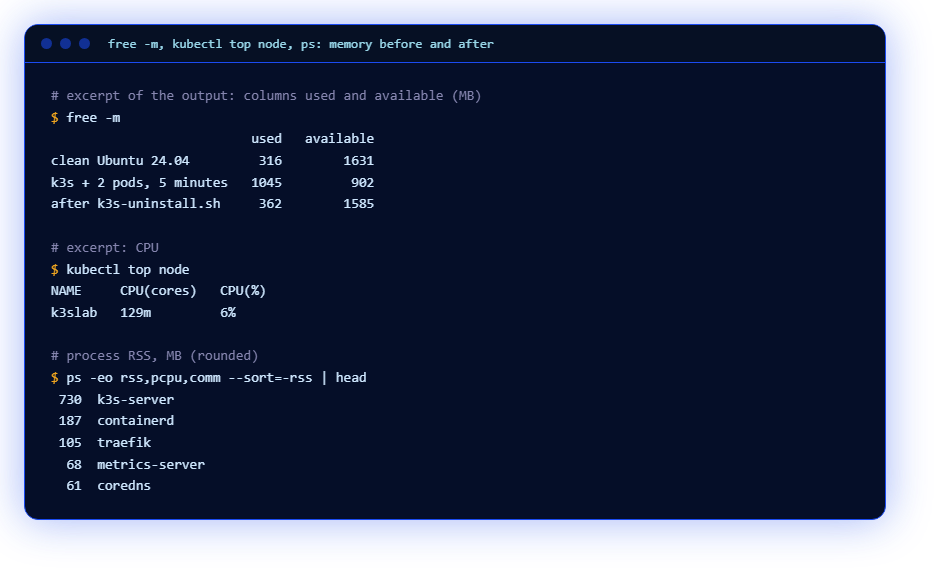
The k3s documentation names 2 CPU cores and 2 GB of RAM as the server minimum. We used exactly that: 2 vCPU and 1948 MB reported by free -m, no swap. Numbers were taken before the install, five minutes after it (with two nginx copies running) and after removal.
| Moment | Used, MB | Available, MB | Disk |
|---|---|---|---|
| Clean Ubuntu 24.04 | 316 | 1631 | 1.6 GB |
| k3s + 2 nginx pods, after 5 minutes | 1045 | 902 | 2.8 GB |
| After k3s-uninstall.sh | 362 | 1585 | 1.6 GB |
By process (RSS): k3s-server 730 MB, containerd 187 MB, Traefik 105 MB, metrics-server 68 MB, CoreDNS 61 MB. At idle the CPU was 93% free, and kubectl top node showed about 129 millicores (6%) of the two vCPUs. The /var/lib/rancher/k3s folder takes 1.1 GB, of which the SQLite database is about 12 MB plus its journal. The takeaway: on 2 GB, about 0.9 GB is left for your own apps. We would pick a plan with 2 vCPU and 4 GB; on HIP that is, for example, the 2 vCPU / 4 GB / 40 GB SSD configuration on the Standard line. We did not try a 1 GB server, but by these numbers k3s alone would not fit there with any margin.
Step 0. Prepare the server and the firewall
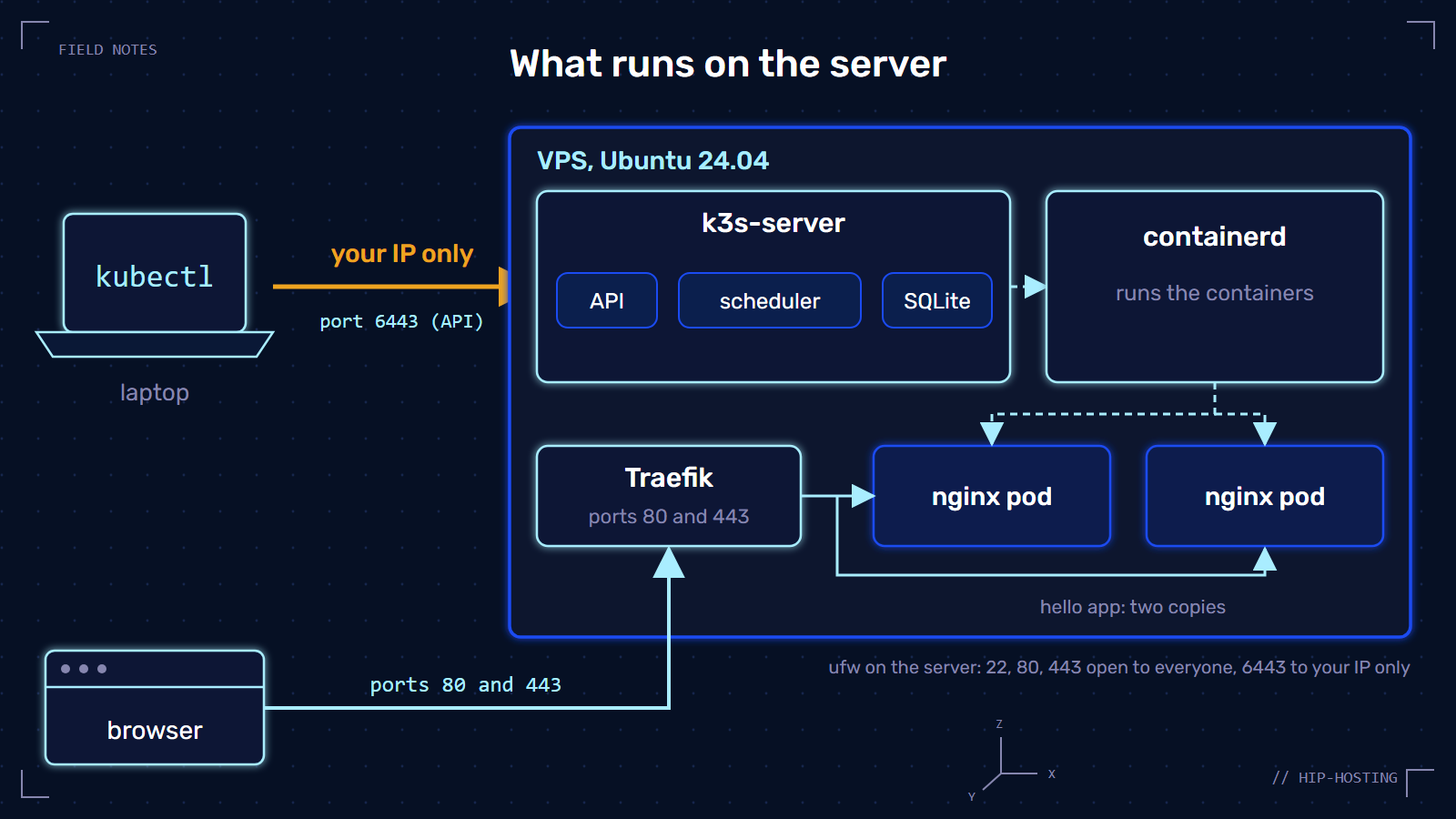
Order a server with Ubuntu 24.04 and log in over SSH (or through the console in the panel). First close everything you do not need: ufw lets in only SSH, web traffic and the Kubernetes API. The rule for 6443 is limited to your address, because the cluster API should not be open to the whole internet. Replace 198.51.100.7 with your own IP. Add the SSH rule before enabling ufw, or you will lock yourself out.
$ ufw default deny incoming
$ ufw default allow outgoing
$ ufw allow 22/tcp
$ ufw allow 80/tcp
$ ufw allow 443/tcp
$ ufw allow from 198.51.100.7 to any port 6443 proto tcp
$ ufw allow from 10.42.0.0/16 to any
$ ufw allow from 10.43.0.0/16 to any
$ ufw --force enable
The last two rules come from the k3s documentation: 10.42.0.0/16 and 10.43.0.0/16 are the pod and service networks inside the cluster. The documentation actually recommends turning ufw off, but we kept it on and everything worked. When we deleted those two rules on a single node, DNS and pod-to-pod traffic kept working anyway. Keep the rules: they cost nothing and will matter when you add a second node. For a second node the documentation also requires UDP 8472 (the flannel network) and TCP 10250 between the nodes; never open 8472 to the internet. Everything here is done by ufw on the server itself (more on it: Nginx and ufw in front of your app).
$ ufw status numbered
     To                         Action      From
[ 1] 22/tcp                     ALLOW IN    Anywhere
[ 2] 80/tcp                     ALLOW IN    Anywhere
[ 3] 443/tcp                    ALLOW IN    Anywhere
[ 4] 6443/tcp                   ALLOW IN    198.51.100.7
[ 5] Anywhere                   ALLOW IN    10.42.0.0/16
[ 6] Anywhere                   ALLOW IN    10.43.0.0/16
Step 1. Install k3s with one command
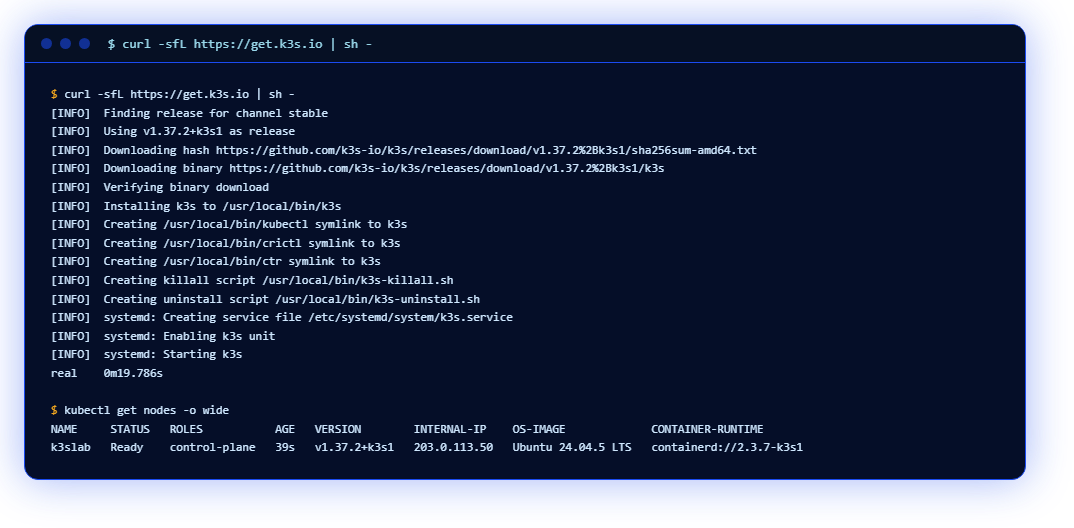
The install script lives at get.k3s.io. Running "download and execute as root" is worth at least a skim. We downloaded the file (1218 lines, 38 KB) and read what it does: it finds the version number in the stable channel, downloads the SHA-256 checksum file and the binary from github.com/k3s-io and verifies them, puts the binary at /usr/local/bin/k3s, creates the kubectl, crictl and ctr links, writes the k3s-killall.sh and k3s-uninstall.sh scripts, creates the systemd service /etc/systemd/system/k3s.service, enables it and starts it. Nothing else. To read it first: curl -sfL https://get.k3s.io -o install-k3s.sh, then less install-k3s.sh and sh install-k3s.sh. We ran it through a pipe ourselves; it is the same file.
$ curl -sfL https://get.k3s.io | sh -
[INFO]  Finding release for channel stable
[INFO]  Using v1.37.2+k3s1 as release
[INFO]  Downloading hash https://github.com/k3s-io/k3s/releases/download/v1.37.2%2Bk3s1/sha256sum-amd64.txt
[INFO]  Downloading binary https://github.com/k3s-io/k3s/releases/download/v1.37.2%2Bk3s1/k3s
[INFO]  Verifying binary download
[INFO]  Installing k3s to /usr/local/bin/k3s
[INFO]  Creating /usr/local/bin/kubectl symlink to k3s
[INFO]  Creating /usr/local/bin/crictl symlink to k3s
[INFO]  Creating /usr/local/bin/ctr symlink to k3s
[INFO]  Creating killall script /usr/local/bin/k3s-killall.sh
[INFO]  Creating uninstall script /usr/local/bin/k3s-uninstall.sh
[INFO]  systemd: Creating service file /etc/systemd/system/k3s.service
[INFO]  systemd: Enabling k3s unit
[INFO]  systemd: Starting k3s
real    0m19.786s
Your version will differ: the script takes whatever is current in the stable channel. To pin a branch, add a variable: INSTALL_K3S_CHANNEL=v1.36 (a minor-version channel) or INSTALL_K3S_VERSION=v1.36.6+k3s1 (an exact version). For a server that will live for years, pinning makes sense: updates then happen when you decide.
Step 2. Check the node and the pods
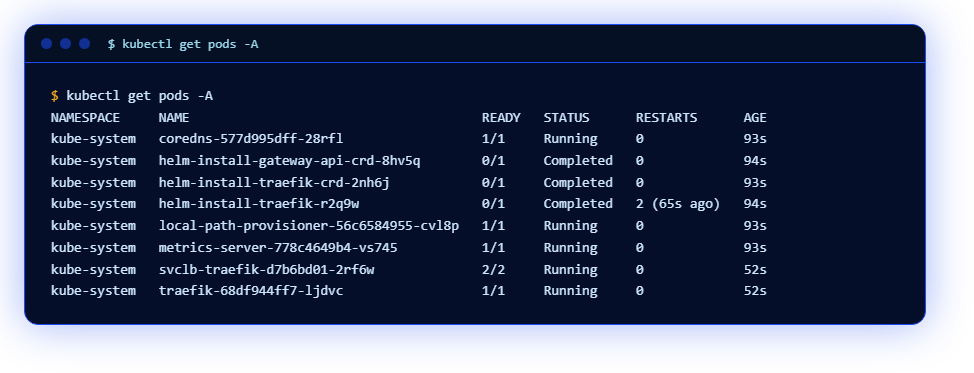
Give it a minute: k3s pulls images and starts the system components. The first check is kubectl get nodes, which should show Ready. The second is the list of pods in all namespaces (-A).
$ k3s --version
k3s version v1.37.2+k3s1 (f6973cb8)
go version go1.26.10

$ kubectl get nodes -o wide
NAME     STATUS   ROLES           AGE   VERSION        INTERNAL-IP    OS-IMAGE             CONTAINER-RUNTIME
k3slab   Ready    control-plane   39s   v1.37.2+k3s1   203.0.113.50   Ubuntu 24.04.5 LTS   containerd://2.3.7-k3s1

$ kubectl get pods -A
NAMESPACE     NAME                                      READY   STATUS      RESTARTS      AGE
kube-system   coredns-577d995dff-28rfl                  1/1     Running     0             93s
kube-system   helm-install-gateway-api-crd-8hv5q        0/1     Completed   0             94s
kube-system   helm-install-traefik-crd-2nh6j            0/1     Completed   0             93s
kube-system   helm-install-traefik-r2q9w                0/1     Completed   2 (65s ago)   94s
kube-system   local-path-provisioner-56c6584955-cvl8p   1/1     Running     0             93s
kube-system   metrics-server-778c4649b4-vs745           1/1     Running     0             93s
kube-system   svclb-traefik-d7b6bd01-2rf6w              2/2     Running     0             52s
kube-system   traefik-68df944ff7-ljdvc                  1/1     Running     0             52s
What is normal here. The helm-install-* pods are one-off jobs that install Traefik; Completed is the right status for them. In the first seconds helm-install-traefik showed Error and restarted, and after a minute it was Completed: do not worry, it was waiting for the other components. The k3s process listens on 6443 (API) and 10250 (kubelet), but you will not see 80 and 443 in ss -ltn: the svclb pod takes those ports. Check them with an HTTP request instead of ss (step 4).
Step 3. Connect from your laptop
The kubectl command already works on the server. But it is more convenient to manage the cluster from your laptop. For that you need a kubeconfig file: the API address, the cluster certificate and your client key. k3s writes it to /etc/rancher/k3s/k3s.yaml. It is the password to the whole cluster, so do not publish it or paste it in a chat; the certificates below are masked.
$ cat /etc/rancher/k3s/k3s.yaml
apiVersion: v1
clusters:
- cluster:
    certificate-authority-data: <MASKED>
    server: https://127.0.0.1:6443
  name: default
...
users:
- name: default
  user:
    client-certificate-data: <MASKED>
    client-key-data: <MASKED>
Copy the file to your laptop (scp root@SERVER:/etc/rancher/k3s/k3s.yaml ~/.kube/k3s-vps.yaml), replace 127.0.0.1 in the server: line with the server address, install kubectl on the laptop and run it with that file:
$ export KUBECONFIG=~/.kube/k3s-vps.yaml
$ kubectl get nodes
We checked this from a separate machine: after replacing the address, kubectl get nodes and kubectl get pods answered. The API certificate is issued for the node name and its address (in our test: k3slab, localhost, the internal addresses and the IP of the network interface). If the public address is not on the server's interface, or you want to connect by domain name, add --tls-san YOUR_ADDRESS at install time: curl -sfL https://get.k3s.io | sh -s - --tls-san k8s.example.com. We did not test that case; it comes from the documentation.
We closed port 6443 to everyone except one address. A check from another address: requests to 6443 and 10250 hung until the timeout (curl exit code 28), while port 80 answered. From the allowed address, curl -k https://SERVER:6443/version returned a JSON with status Failure (the API gives nothing without a key), so the port is visible but only usable with credentials. If your IP changes often, it is safer not to open 6443 at all and go through an SSH tunnel, ssh -L 6443:127.0.0.1:6443 root@SERVER, leaving 127.0.0.1 in the kubeconfig. We did not run that variant; it is a standard SSH feature.
Step 4. The first app: Deployment, Service, Ingress
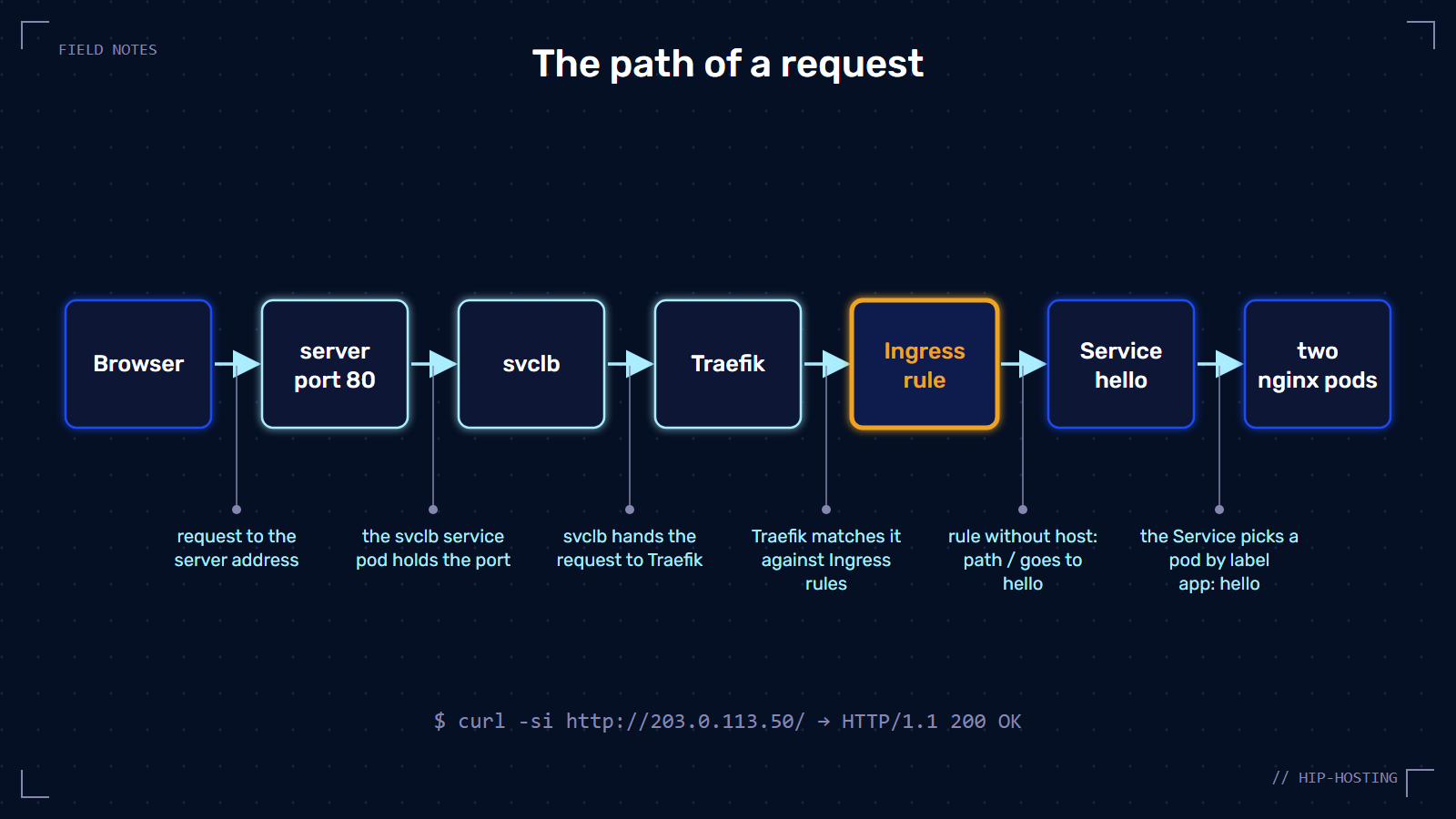
An app in Kubernetes is described with three objects. A Deployment says which container to run and how many copies to keep alive. A Service gives those copies one internal name and address, however the pods themselves change. An Ingress is a rule for outside traffic: which path or domain goes to which Service. The bundled Traefik receives that traffic. Save the manifest as hello.yaml. The limits.memory setting protects the rest of the server: if the app starts to leak, its container gets killed, not the whole machine.
apiVersion: apps/v1
kind: Deployment
metadata:
  name: hello
spec:
  replicas: 2
  selector:
    matchLabels:
      app: hello
  template:
    metadata:
      labels:
        app: hello
    spec:
      containers:
        - name: web
          image: nginx:1.29-alpine
          ports:
            - containerPort: 80
          resources:
            requests:
              cpu: 20m
              memory: 16Mi
            limits:
              memory: 64Mi
---
apiVersion: v1
kind: Service
metadata:
  name: hello
spec:
  selector:
    app: hello
  ports:
    - port: 80
      targetPort: 80
---
apiVersion: networking.k8s.io/v1
kind: Ingress
metadata:
  name: hello
spec:
  rules:
    - http:
        paths:
          - path: /
            pathType: Prefix
            backend:
              service:
                name: hello
                port:
                  number: 80
Apply it and wait until both copies are ready:
$ kubectl apply -f hello.yaml
deployment.apps/hello created
service/hello created
ingress.networking.k8s.io/hello created
$ kubectl rollout status deployment/hello --timeout=180s
deployment "hello" successfully rolled out
$ kubectl get ingress
NAME    CLASS     HOSTS   ADDRESS        PORTS   AGE
hello   traefik   *       203.0.113.50   80      4s
Now open http://SERVER_ADDRESS/ in a browser or request it with curl. A rule without a host field sends any request that arrives on port 80 to the app:
$ curl -si http://203.0.113.50/ | head -8
HTTP/1.1 200 OK
Accept-Ranges: bytes
Content-Length: 896
Content-Type: text/html
Server: nginx/1.29.8
We requested it both from inside the server and from another machine: code 200 both times. If the server already runs nginx or Apache on ports 80 and 443, Traefik can only get the ports that are free. We did not reproduce that situation in our test, so on a busy server first free the ports, or install k3s with --disable=traefik and bring your own ingress.
Step 5. A domain and HTTPS
A domain needs two things. First, an A record pointing to the server address. Second, a host field with that name in the Ingress. We tested name-based routing with a Host header: with app.example.com the answer was 200, with any other name Traefik returned 404. So one server can carry many domains, each with its own Ingress.
spec:
  rules:
    - host: app.example.com
      http:
        paths:
          - path: /
            pathType: Prefix
            backend:
              service:
                name: hello
                port:
                  number: 80
HTTPS certificates in Kubernetes are most often issued through cert-manager, which requests a certificate from Let's Encrypt and renews it. We did not install cert-manager on this stand (the test machine has no public domain), so we give no commands here rather than pass off untested ones. That is the only step we did not complete for port 443. Port 443 is already open in the firewall.
Backup: what to copy
The whole cluster state (Deployment, Service and Ingress objects, secrets) sits in the SQLite database in /var/lib/rancher/k3s/server/db. The documentation adds the file /var/lib/rancher/k3s/server/token: the token encrypts the confidential data in the database, so a copy of the database is useless without it (on restore, put the file back or pass its value with --token). For SQLite the documentation requires no special commands, but we stop k3s while copying so the database file does not change mid-archive. The archive took 0.55 s. The containers keep running meanwhile: stopping the k3s service does not kill them (only k3s-killall.sh does).
$ systemctl stop k3s
$ tar -czf /root/backup/k3s-$(date +%F).tar.gz -C /var/lib/rancher/k3s/server db token
$ systemctl start k3s
$ ls -lh /root/backup/
-rw-r--r-- 1 root root 4.8M Nov 25 10:12 k3s-2026-11-25.tar.gz
Keep the archive off this server: it holds the cluster secrets. Now the restore check. We deleted the app (kubectl delete -f hello.yaml), stopped k3s, moved the old db folder away and unpacked the archive back:
$ systemctl stop k3s
$ mv /var/lib/rancher/k3s/server/db /var/lib/rancher/k3s/server/db.broken
$ tar -xzf /root/backup/k3s-*.tar.gz -C /var/lib/rancher/k3s/server
$ systemctl start k3s
$ kubectl get deploy,pods
NAME                    READY   UP-TO-DATE   AVAILABLE   AGE
deployment.apps/hello   2/2     2            2           3m7s
The objects came back from the archive. The k3s etcd-snapshot save command does not work on our SQLite cluster: the reply is etcd datastore disabled. etcd snapshots exist only for a cluster with embedded etcd (the --cluster-init option); we did not run that and do not describe it here. Application data on persistent volumes is not in this archive and must be copied separately. We created no volumes on the stand, so that method is untested.
Upgrading and removing
An upgrade is the same install script with the same parameters. We installed the 1.36 branch (INSTALL_K3S_CHANNEL=v1.36, which gave v1.36.6), started the app, and then ran the ordinary install command:
$ curl -sfL https://get.k3s.io | sh -
[INFO]  Using v1.37.2+k3s1 as release
...
[INFO]  systemd: Starting k3s
$ k3s --version
k3s version v1.37.2+k3s1 (f6973cb8)
$ kubectl get pods
NAME                    READY   STATUS    RESTARTS   AGE
hello-fccfc7874-b8fkt   1/1     Running   0          83s
hello-fccfc7874-l9bkk   1/1     Running   0          83s
Two minutes later the node showed v1.37.2, the app pods had not restarted (their age is an unbroken 83 seconds) and the site answered 200. If you installed k3s with special parameters, repeat them on upgrade: parameters you leave out are lost. Do not skip versions: Kubernetes rules say to move one minor version at a time (1.36 to 1.37, not 1.35 to 1.37). Running it again on the same version is harmless: No change detected so skipping service start.
To remove: /usr/local/bin/k3s-uninstall.sh. It stopped everything and removed the cni0 and flannel.1 network interfaces, the kernel firewall rules and the contents of /var/lib/rancher. On our server it took 5 seconds and gave back 1.2 GB of disk; used memory fell from 990 to 362 MB. An empty /etc/rancher/node directory stayed, and so did the ufw rules (they are yours). Removal cannot be undone: the app data goes with the cluster, so back up first.
What breaks
- Not enough memory. k3s with its system pods takes roughly 0.7 to 1 GB. On 2 GB the margin is thin: a little over 0.9 GB is left for your apps. Under pressure the kernel kills the hungriest process (how to read that in dmesg). Set
limits.memoryon every app. - Swap. Our server had no swap. We did not test swap together with k3s, so we claim nothing about it.
- A closed port. With 6443 closed, kubectl on the laptop stays silent until the timeout; with 80 or 443 closed, the app will not open from outside even though it works from inside the server. Check this first.
- Port 80 taken. Nginx, Apache or a panel on 80 or 443 gets in Traefik's way (see step 4). We did not reproduce this.
- Node name. A cluster cannot have two nodes with the same hostname. It does not matter for one server, but when you add a second, give them different names (
--node-name). - One server. A reboot or failure of the VPS stops everything. k3s starts by itself after a reboot (the service is enabled at boot; we did not test the reboot itself), but there will still be downtime.
In short
- k3s is real Kubernetes in one file. For the Kubernetes API on one server it fits; for two containers, Docker Compose is simpler.
- The documented minimum is 2 vCPU and 2 GB; in our run k3s with Traefik, CoreDNS and metrics-server used about 730 MB, and at idle the CPU was 93% free.
- The install is one command and 20 seconds; the node is Ready in about a minute. You can download and read the script before running it.
- Open 80 and 443 to everyone, 6443 only to your IP, or use an SSH tunnel.
- For a backup, stop k3s and take
/var/lib/rancher/k3s/server/dbandtoken; the restore was tested. - To upgrade, run the installer again, one minor version at a time.
FAQ
Can I run Kubernetes on a single VPS?
Yes, that is what k3s is for. It installs with one command, and a server with 2 vCPU and 2 GB of RAM is the documented minimum. On the server from this article the cluster with two nginx copies used about 0.7 GB of RAM. A single node has no fault tolerance: if the server goes down, so does the cluster.
How is k3s different from regular Kubernetes (k8s)?
The API and commands are the same. The packaging differs: k3s is one file under 100 MB with CoreDNS, Traefik and metrics-server included, and it keeps its state in SQLite by default instead of etcd. For large multi-node clusters people usually pick full Kubernetes or k3s with embedded etcd or an external database.
How do I reach an app on k3s by the server IP?
Create a Deployment, a Service and an Ingress without a host field: the bundled Traefik accepts the request on port 80 of the server and passes it to the app. In our test curl http://ADDRESS/ returned 200. Ports 80 and 443 must be open in the firewall.
How do I connect to k3s from my laptop?
Copy /etc/rancher/k3s/k3s.yaml to the laptop, replace 127.0.0.1 in it with the server address and point the KUBECONFIG variable at the file. Open port 6443 only for your own IP. The file holds access keys to the cluster, so treat it like a password.
How do I back up k3s?
Stop the service, archive the folder /var/lib/rancher/k3s/server/db and the file token, then start the service again. We did exactly that and restored a deleted app from the archive. The k3s etcd-snapshot command works only on a cluster with embedded etcd; on SQLite it returns an error.
Not tested: cert-manager and a Let's Encrypt certificate, an SSH tunnel to 6443, --tls-san, etcd snapshots, port 80 already taken, swap enabled, a 1 GB server, second and further nodes, persistent volumes, and behaviour on a physical HIP VPS (the test ran on a virtual machine with the same Ubuntu 24.04; the commands are identical).