A cloud server is a virtual server, the same kind of machine as a VPS, but with a different set of things around it: where its disk lives, what happens when the physical host breaks, how you pay and how you resize it. In hosting the word "cloud" has no standard meaning, so the label alone tells you very little. This guide separates what is technically different from what is marketing, then gives a choice for a beginner and for a project.
What is a cloud server
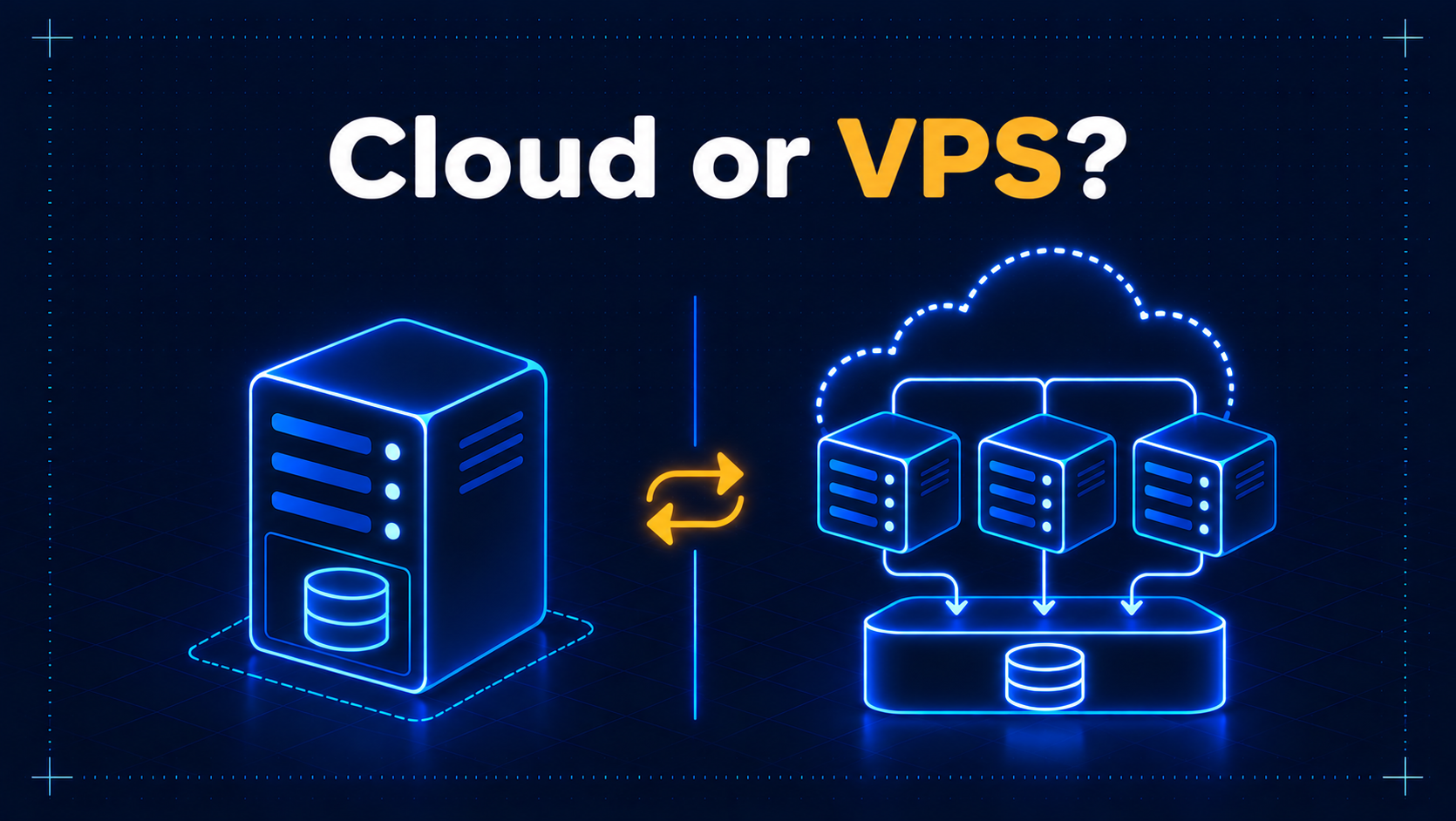
A cloud server is a virtual machine that runs on a pool of physical servers instead of one fixed box, and is handled as a resource: you create, resize and delete it on demand. The reference definition comes from NIST (SP 800-145, 2011), which names five traits of cloud computing: self-service on demand, access over the network, pooled resources, rapid elasticity and metered usage. Hosting sellers use the word more loosely. Some offers have all five. Some put "cloud" on an ordinary VPS because it sells better.
The search phrase "virtual cloud server" is the same thing said twice: a cloud server is virtual by definition. Underneath, both a VPS and a cloud server run on a hypervisor, software (on Linux, usually KVM) that slices one physical machine into isolated virtual ones. That layer is identical. The difference is in what stands under it and around it.
How a cloud server differs from a VPS
Where the disk lives
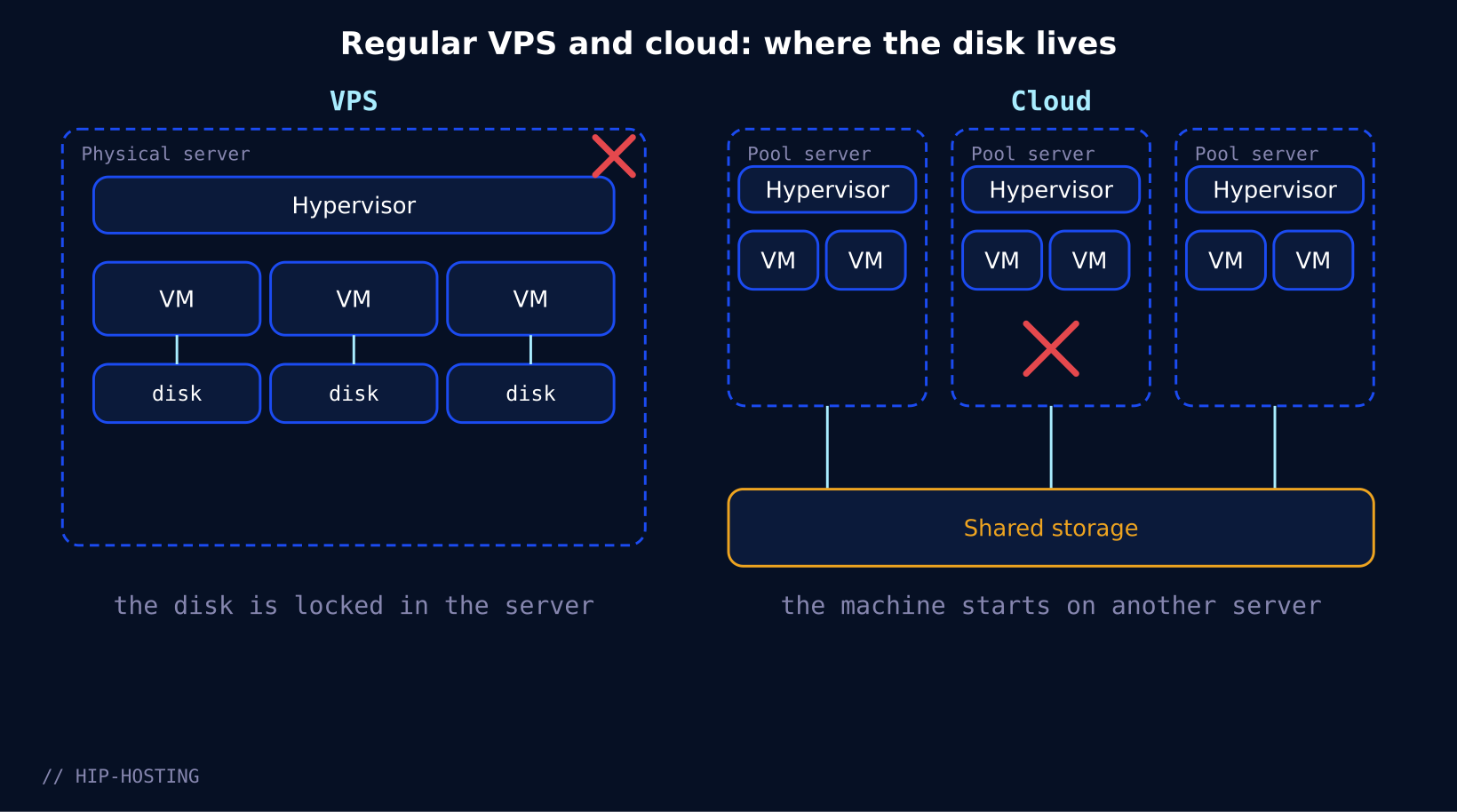
On a classic VPS the virtual disk usually sits on drives inside the same physical host. It is simple, fast and cheap, and it has one weakness: if the host dies, your disk is locked inside it until someone repairs or replaces the machine. In a cloud setup the disks typically live on a separate storage cluster and attach over the network, so any host in the pool can start your machine. Network storage costs more to build and adds a little delay to each disk operation, which is part of why the price is higher. Many providers mix the two, so the word does not tell you which one you get.
What happens when the host fails
Two different mechanisms hide behind "failover". Restart on another host: the host dies, the platform notices, your machine boots again elsewhere. You see a reboot and minutes of downtime. Live migration: the provider moves a running machine to another host for maintenance, usually with no reboot at all. Both need your disk to be reachable from the new host.
Neither protects you from yourself. A dropped database, a broken update or a hacked server gets restarted faithfully on the new host. Backups stay your job in either model.
How you pay
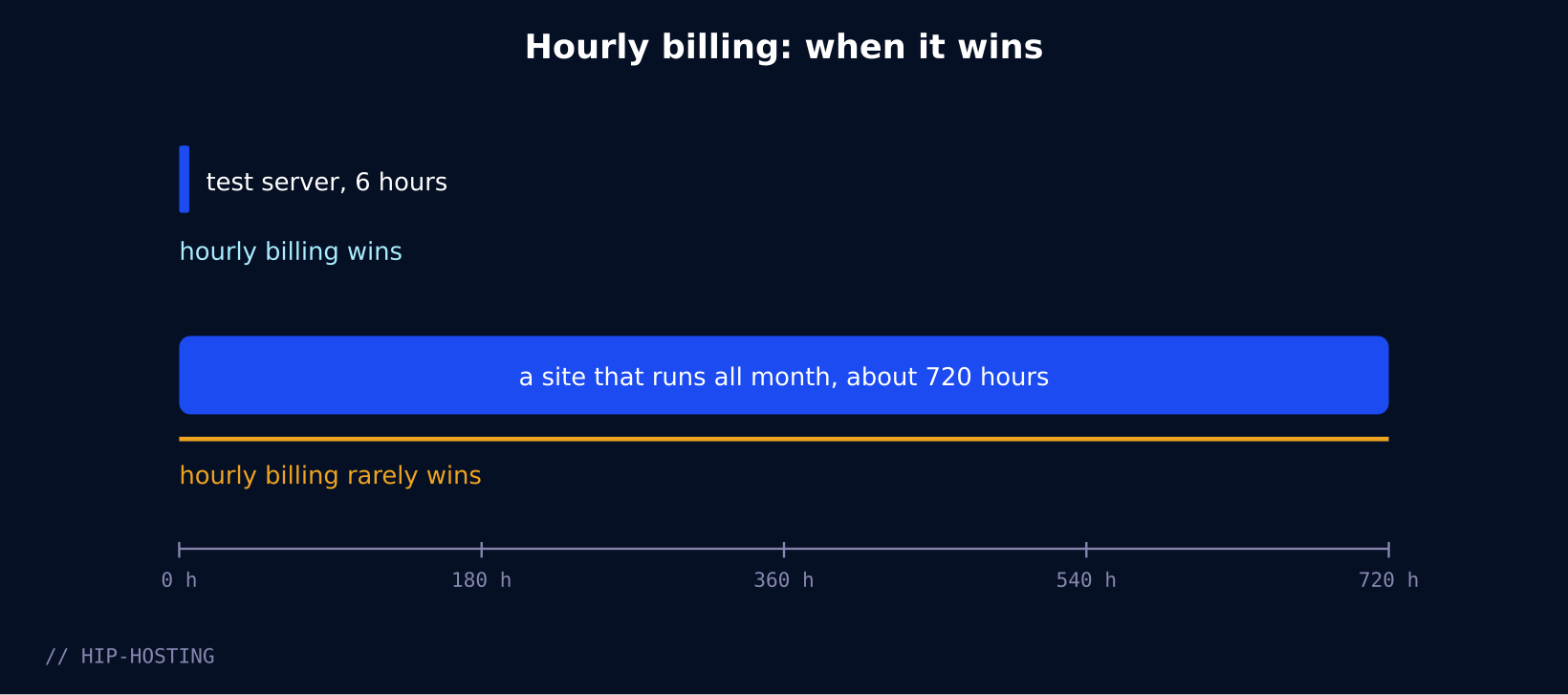
A VPS is normally sold for a fixed period, most often a month. A cloud server is often metered by the hour, so a machine that lived six hours costs six hours. Do the arithmetic before you get excited: a month is about 720 hours, so a server that runs all month at an hourly rate costs, as a rule, about the same as a flat monthly plan or more. Hourly billing wins for short-lived things: a test environment, a one-day load test, a build machine. For a site that is on all the time it is rarely cheaper.
How you resize
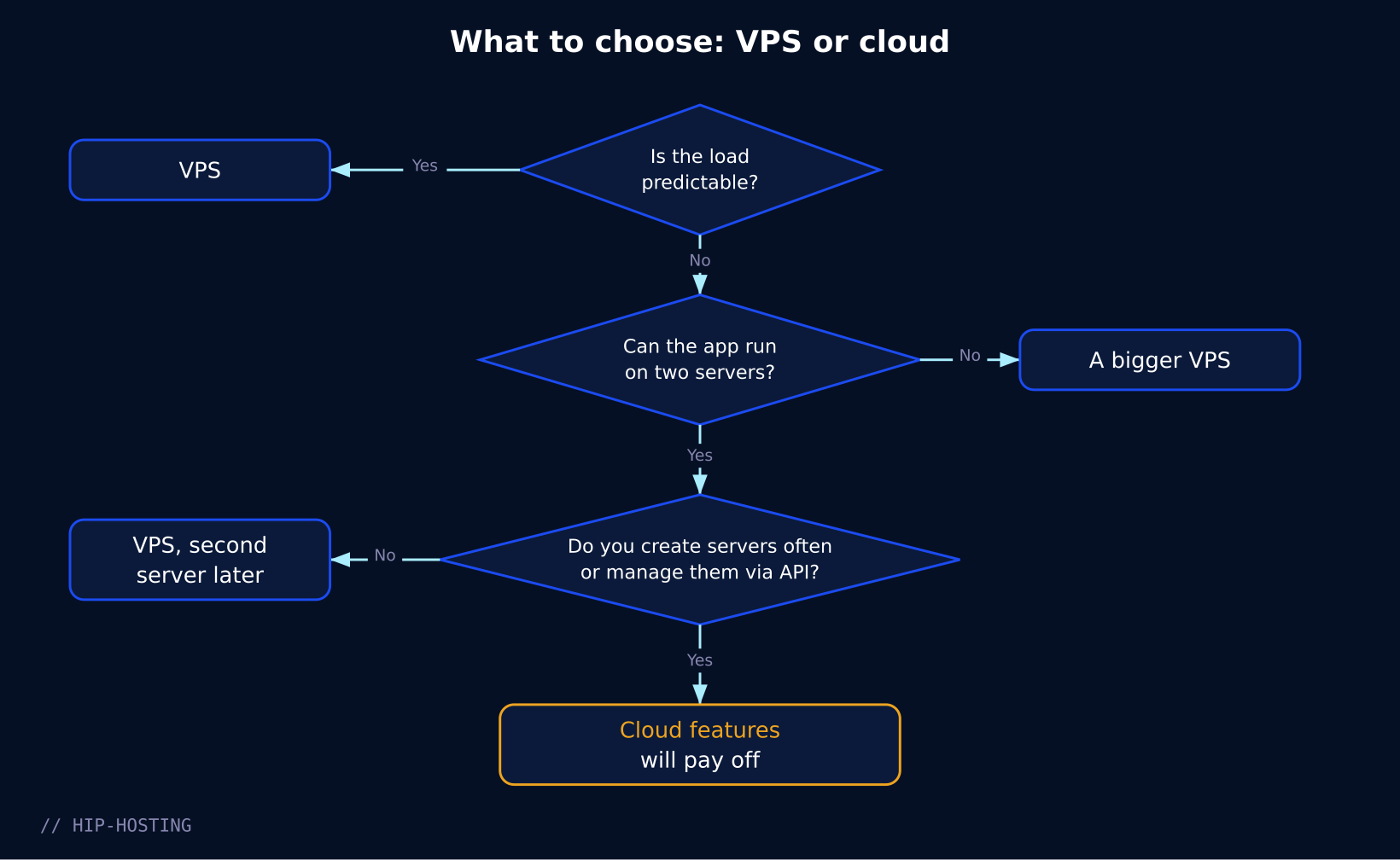
On a VPS you move to a bigger plan, and the machine is usually stopped for a short time while the resources change. In a cloud, resizing is often an API call (a command a program sends to the provider to do the same thing automatically). Autoscaling, where servers are added and removed by load without you, exists in some clouds, but it only helps if your application can run on several servers at once. A single site with one database almost never can. For that site a bigger machine is the answer.
| Aspect | Typical VPS | Typical "cloud server" | HIP-HOSTING (what the plan pages and panel confirm) |
|---|---|---|---|
| Virtualization | KVM or a container | Usually KVM | KVM |
| Disk | Drives inside the host | Often a network storage cluster | SSD on Standard and Memory, NVMe on Hi-CPU; local or network is not stated |
| Host failure | Wait for repair or restore from backup | Restart elsewhere or live migration | Not described |
| Billing | Fixed period, usually monthly | Often hourly | Monthly price; renewal confirms one period; hourly is not stated |
| Resizing | Bigger plan, short stop | API, sometimes without a stop | Scale tab: server is powered off, disk cannot shrink |
| Snapshots | Varies | Usually yes | None in the panel; backups are on your side |
| API | Rare | Usual | Not described |
What HIP-HOSTING offers, and what it does not claim
HIP-HOSTING sells KVM virtual servers under the names VPS and VDS; the panel calls them hiplets. The right-hand column of the table is everything the plan pages and the panel confirm. Automatic restart on another host, live migration, hourly billing and autoscaling are not described there, so do not count on them. If you need one of them, ask support before you pay, in writing: a guess is not a guarantee. What you do get is a full virtual machine with root access, OS reinstall, a web console in the panel, and a Scale tab. For the label question, see also VPS vs VDS.
Cloud server or VPS: which one to choose
| Your situation | Take | Why |
|---|---|---|
| First site, blog or landing page | VPS | The load is small and steady; you pay for a month, not for options |
| Telegram bot, small API, personal tools | VPS | One process, one machine, a restart is usually quick |
| Learning Linux or Docker | VPS | Reinstall is available in the panel; cost stays predictable |
| Test environments that appear and vanish daily | Cloud | Hourly billing and an API match the way you work |
| Traffic spikes you cannot predict | Cloud, if the app scales out | Otherwise a larger VPS is simpler and cheaper |
| A business service that must not stop | Two servers, a load balancer, tested backups | Automatic restart covers one kind of failure; it does not protect against deleted data or application bugs |
If you are a beginner, start with a KVM VPS you can reinstall at any time and set up backups on day one; the guide How to back up your HIP server yourself shows how. Over time you will see which cloud features you actually miss. A slow server is usually a memory or processor problem, not a "wrong type" problem; the slow-server diagnostics guide helps tell which.
Six questions to ask before you pay for the word "cloud"
- Where is the disk? On the host or on network storage. It decides what survives a hardware failure.
- What happens if the host dies? Automatic restart, live migration, or a support ticket. Ask for the answer in writing.
- How is it billed? By the hour or by the month, and whether a stopped server still costs money.
- How do I resize? Without reinstalling? With how much downtime? Can the disk shrink?
- Are there snapshots and backups? And who runs them. If it is you, set aside time for it.
- Is there an API? Needed only if you automate. If you do not, ignore this line and do not pay for it.
Frequently asked questions
What is a cloud server in simple words?
It is a virtual computer that lives on a pool of physical servers instead of one box, and that you can create, resize and delete on demand. A VPS is also a virtual computer, but it is usually tied to one host and sold for a fixed period.
Is a cloud server better than a VPS?
Not by default. It is better when your load changes a lot, when you create servers often or when you automate. For a steady site or a bot, a VPS does the same work and usually costs less.
Is a virtual cloud server different from a cloud server?
No. A cloud server is virtual by definition, so the phrase repeats itself. Read the specification of the offer: the virtualization type, where the disk is, how billing works.
Is a cloud server faster than a VPS?
The label does not decide speed. Processor, disk type and network do. Network storage can add a small delay to disk operations compared with fast local drives, so measure on your own workload instead of trusting a name.
Does a cloud server protect me from data loss?
Only from the loss of a physical host. It does not protect you from a deleted database, a bad update or an attack, because the new host starts the same broken machine. Keep backups off the server either way.
Does HIP-HOSTING offer cloud servers?
HIP-HOSTING sells KVM virtual servers in three lines: Standard, Memory and Hi-CPU. By their description they are plain virtual machines: automatic restart on another host, hourly billing and autoscaling are not described on the plan pages, so do not assume them. Judge by the specs, not by the word. If you need one, ask support first.
Takeaways
- A cloud server and a VPS are both virtual machines on a hypervisor; "cloud" is defined by what is around the machine.
- The four real differences: where the disk lives, what happens when the host fails, hourly or monthly billing, resizing by API.
- Host failover does not replace backups: it restarts your mistakes too.
- Hourly billing helps short-lived servers; for one that runs all month, about 720 hours, it rarely saves money.
- For a first site, bot or learning project take a KVM VPS. Move to cloud features when you can name the one you miss.
- Ask the six questions before paying, and treat anything not written in the description as not promised.