
You can run a language model on a VPS with no GPU if the model is small and quantized. On a 2 vCPU, 4 GB HIP-HOSTING server we built llama.cpp and ran Qwen2.5 models from 0.5B to 3B parameters: 22 tokens per second from the 0.5B model, 12.6 from the 1.5B and 6.6 from the 3B. The RAM you need is roughly the model file plus the context plus a margin; below is each part with real numbers.
All numbers come from one pass on 2026-11-22 on a single HIP-HOSTING VPS: Ubuntu 24.04.5, 2 vCPU (Intel Xeon Cascadelake, 2.0 GHz, AVX2 and AVX512), 3915 MiB of RAM, no swap, no GPU. llama.cpp is built from commit 8d60873; the models are Qwen2.5 Instruct in GGUF format from Hugging Face. GB in the file tables are decimal (10^9 bytes), MiB and GiB are binary and about 5 to 7% bigger.
How it works
A language model is a very large table of numbers called weights (0.5B, 1.5B and 3B mean billions of them; vCPU is a virtual CPU core). To produce each new word fragment (a token), the program reads all of those weights once. A CPU has a few cores, and for text generation its limit is usually not the arithmetic but how fast the weights travel from RAM to the cores. That one fact explains most of the results below.
llama.cpp is an open-source program that runs models on an ordinary CPU. It reads the GGUF format, a single file with the weights, the tokenizer and the chat template. It ships a benchmark tool (llama-bench), a command-line chat (llama-cli) and an HTTP server (llama-server) with an OpenAI-style API.
Quantization in plain words
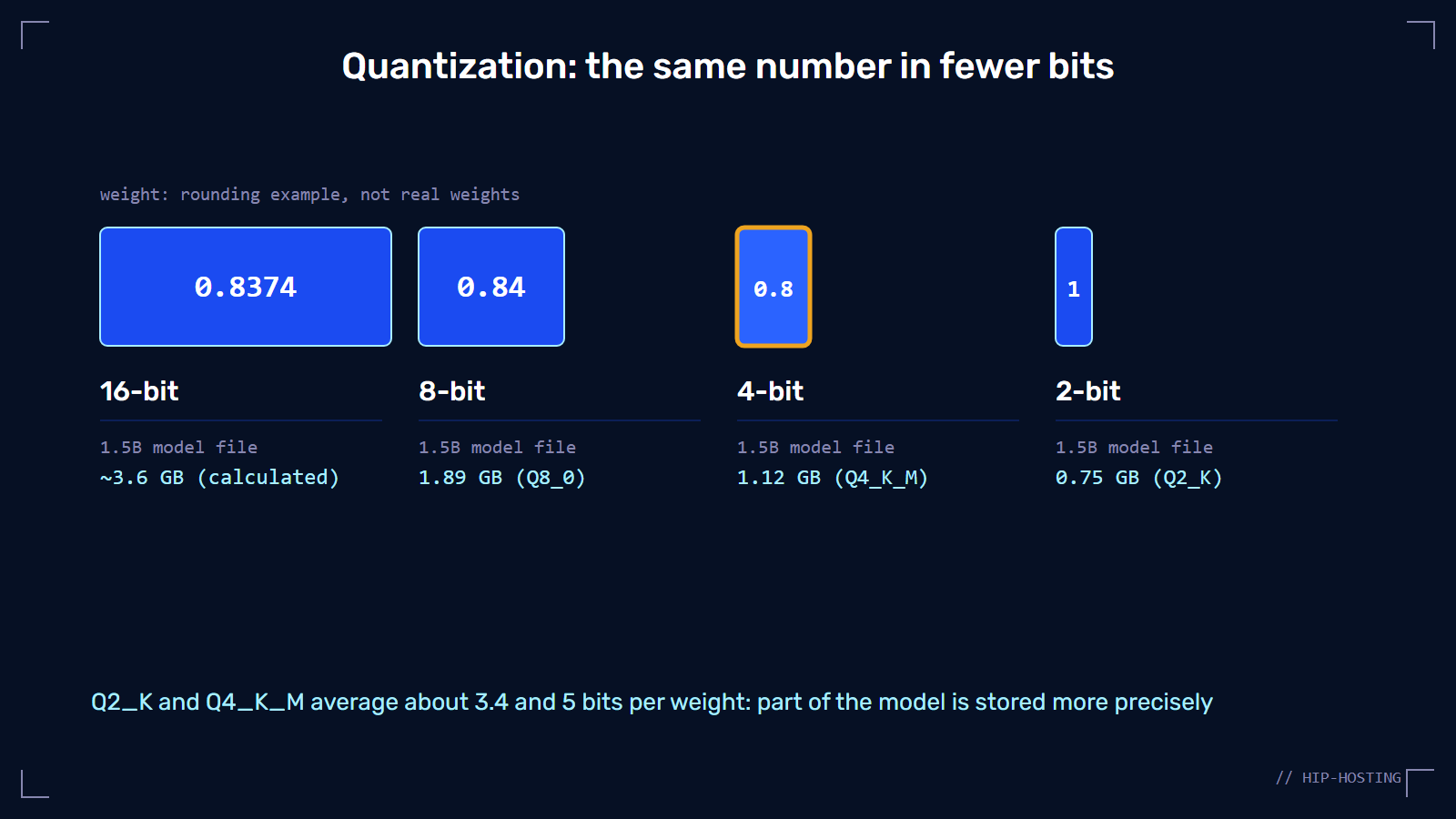
The original weights are stored as 16-bit numbers. Quantization stores each one with fewer bits, for example, the number 0.8374 can be written as 0.84: it takes less space and is less precise. The names say how: Q4 means roughly 4 bits per weight, Q8 roughly 8, Q2 roughly 2. The K marks the block scheme of llama.cpp, and _M means "medium": sensitive parts of the model keep more precision.
We calculated the averages ourselves: model size from llama-bench divided by the number of parameters. A 16-bit copy of the 1.5B model would be about 3.6 GB (calculated, not downloaded). Q4_K_M lands at about 5 bits, not 4, because some parts of the model keep higher precision.
| File | Size on disk | Bits per weight (calculated) |
|---|---|---|
| Qwen2.5 1.5B Q2_K | 753 MB | 3.4 |
| Qwen2.5 1.5B Q4_K_M | 1117 MB | 5.0 |
| Qwen2.5 1.5B Q8_0 | 1895 MB | 8.5 |
| Qwen2.5 3B Q4_K_M | 2105 MB | 4.9 |
Step 1. Build llama.cpp
Building from source is two commands, and the binary is tuned for your CPU. GGML_NATIVE makes it use -march=native, which means the program may not start on a different CPU, so build on the server where you will run it. -j2 runs two compile jobs, matching our two vCPUs:
$ apt install -y build-essential cmake git libcurl4-openssl-dev
$ git clone --depth 1 https://github.com/ggml-org/llama.cpp /opt/lab-llm/llama.cpp
$ cd /opt/lab-llm/llama.cpp
$ cmake -B build -DGGML_NATIVE=ON -DCMAKE_BUILD_TYPE=Release
$ cmake --build build --config Release -j2 --target llama-bench llama-cli llama-server llama-completion
966.62user 50.53system 9:09.45elapsed 185%CPU
The last line is the build time report: 9 minutes 9 seconds. The programs end up in build/bin/.
Step 2. Download the models
The Qwen team publishes GGUF files on Hugging Face, one per quantization. curl -L -O follows redirects and keeps the file name:
$ mkdir -p /opt/lab-llm/models && cd /opt/lab-llm/models
$ curl -L -O https://huggingface.co/Qwen/Qwen2.5-1.5B-Instruct-GGUF/resolve/main/qwen2.5-1.5b-instruct-q4_k_m.gguf
$ ls -l
-rw-r--r-- 1 root root 491400032 qwen2.5-0.5b-instruct-q4_k_m.gguf
-rw-r--r-- 1 root root 752880160 qwen2.5-1.5b-instruct-q2_k.gguf
-rw-r--r-- 1 root root 1117320736 qwen2.5-1.5b-instruct-q4_k_m.gguf
-rw-r--r-- 1 root root 1894532128 qwen2.5-1.5b-instruct-q8_0.gguf
-rw-r--r-- 1 root root 2104932768 qwen2.5-3b-instruct-q4_k_m.gguf
Only the first curl is shown; the others differ in repository (Qwen2.5-0.5B, -3B) and file name. All five take 6.4 GB, so check df -h / first.
Step 3. Measure the speed
llama-bench reports two speeds. pp512 is prompt processing: how fast the model reads 512 input tokens before it starts to answer. tg128 is generation: how fast it writes 128 new tokens. -t 2 is the thread count (our vCPUs), -r 3 averages three runs, and the number after ± is the spread between them. We shortened the quantization name in the output to Q4_K_M.
$ ./build/bin/llama-bench -m /opt/lab-llm/models/qwen2.5-1.5b-instruct-q4_k_m.gguf -p 512 -n 128 -t 2 -r 3
| model | size | params | backend | threads | test | t/s |
| ------------------------ | --------: | ------: | ------- | ------: | ----: | ------------: |
| qwen2 1.5B Q4_K_M | 1.04 GiB | 1.78 B | CPU | 2 | pp512 | 55.89 ± 0.03 |
| qwen2 1.5B Q4_K_M | 1.04 GiB | 1.78 B | CPU | 2 | tg128 | 12.58 ± 0.26 |
build: 8d60873 (1)
The same for all five files:
| Model | File | Reading, tokens/s (pp512) | Writing, tokens/s (tg128) |
|---|---|---|---|
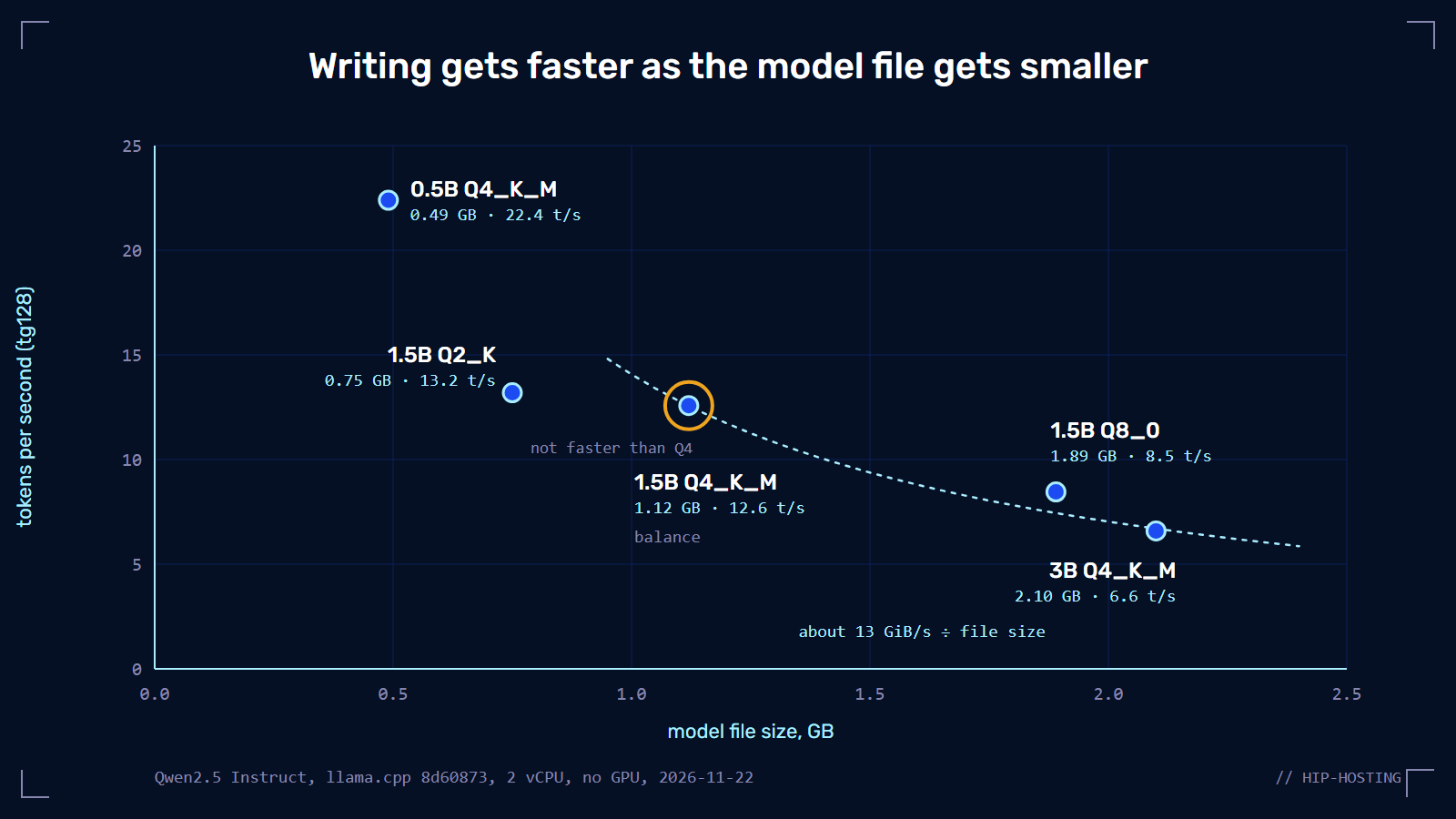
| 0.5B Q4_K_M | 0.49 GB | 115.0 | 22.4 |
| 1.5B Q2_K | 0.75 GB | 55.0 | 13.2 |
| 1.5B Q4_K_M | 1.12 GB | 55.9 | 12.6 |
| 1.5B Q8_0 | 1.89 GB | 36.3 | 8.5 |
| 3B Q4_K_M | 2.10 GB | 26.9 | 6.6 |
Writing speed follows the file size: tokens per second times file size in GiB gives 14.9 for Q8_0, 13.1 for the 1.5B Q4_K_M and 12.9 for the 3B Q4_K_M, so the CPU reads about 13 to 15 GiB of weights per second (a rule of thumb from three points; the 0.5B model sits lower, at about 10). Q2_K was not faster than Q4_K_M (13.2 against 12.6): the file is 0.4 GB smaller, possibly because 2-bit numbers are heavier to decode, which we did not test. Q8_0 costs a third of the speed against Q4_K_M for 70% more file. Set the thread count to the number of vCPUs: for the 1.5B Q4_K_M one thread gave 7.1 tokens per second, two gave 12.8 (a separate tg64 run), and four on our two vCPUs gave 11.3.
How much RAM does a model need
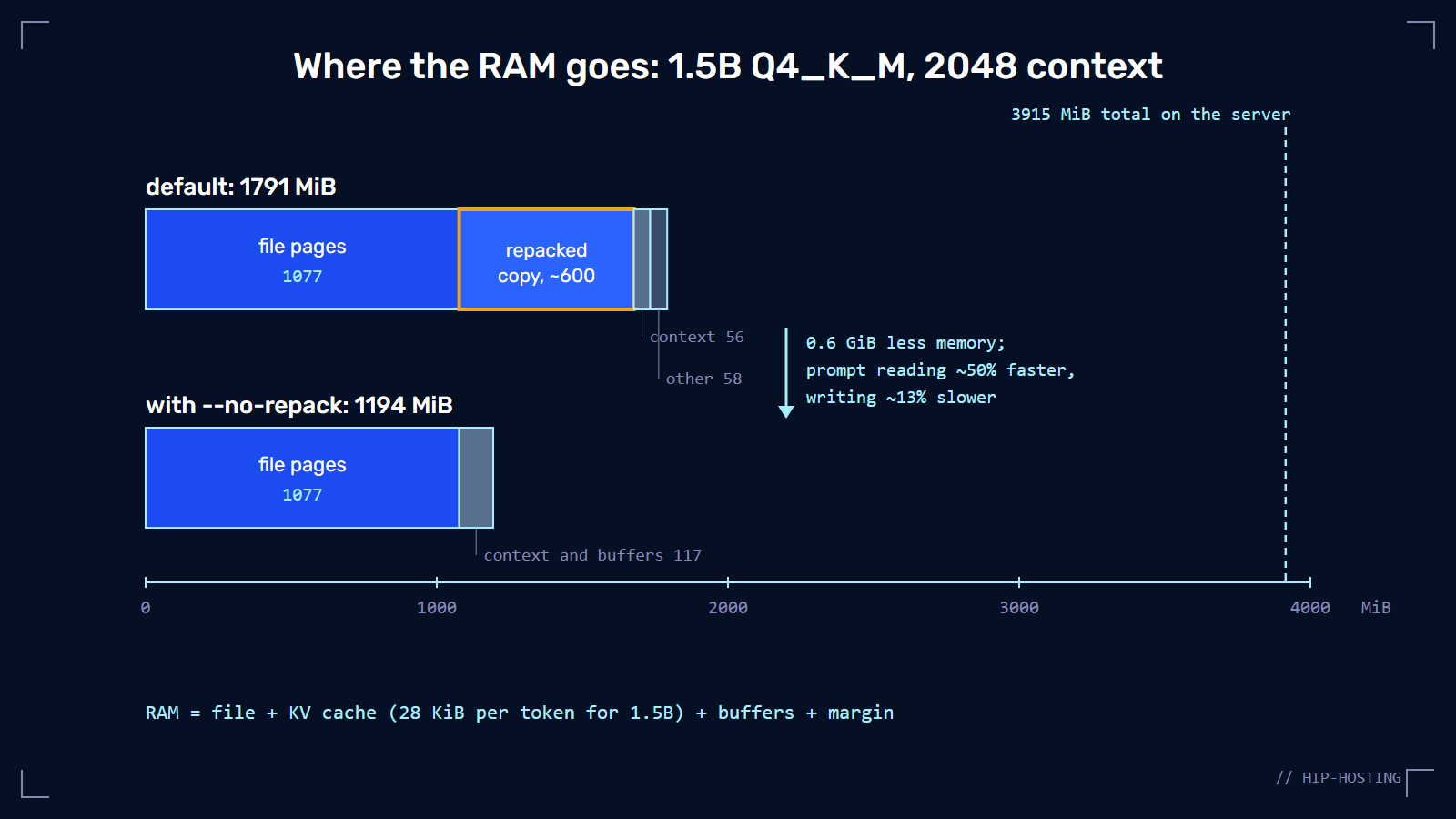
The estimate is: RAM = model file + context memory (KV cache) + working buffers + a margin for the system. The KV cache is the model's short-term memory of the conversation: it keeps data for each layer for every context token, so it grows linearly with the context length. llama.cpp prints its size at start:
$ ./build/bin/llama-completion -m ...qwen2.5-1.5b-instruct-q4_k_m.gguf -p Hi -n 1 -c 4096 -no-cnv -v 2>&1 | grep -E "n_layer |n_head_kv|llama_kv_cache: size"
print_info: n_layer = 28
print_info: n_head_kv = 2
llama_kv_cache: size = 112.00 MiB ( 4096 cells, 28 layers, 1/1 seqs), K (f16): 56.00 MiB, V (f16): 56.00 MiB
-c 4096 asks for a 4096-token context. 112 MiB for 4096 tokens is 28 KiB per token. The 0.5B model came out at 12 KiB and the 3B at 36 KiB. Peak memory of the 1.5B Q4_K_M measured with /usr/bin/time -v agrees: 1779 MiB at -c 2048, 1835 at 4096, 2173 at 16384 and 2621 at 32768, so from 4096 to 32768 it grows by 786 MiB, again 28 KiB per token.
Now the real totals: llama-server with a 2048 context, one tiny request, process memory read from /proc. RssAnon is memory the program allocated itself; RssFile is pages mapped straight from the model file.
| Model | File, MiB | Process memory total, MiB | Own (anon), MiB | From file, MiB |
|---|---|---|---|---|
| 0.5B Q4_K_M | 469 | 591 | 111 | 480 |
| 1.5B Q2_K | 718 | 1118 | 389 | 729 |
| 1.5B Q4_K_M | 1066 | 1791 | 714 | 1077 |
| 1.5B Q8_0 | 1807 | 1934 | 117 | 1818 |
| 3B Q4_K_M | 2007 | 3419 | 1401 | 2019 |
For Q8_0 and the 0.5B model the total is close to "file plus 120 MiB". For Q4_K_M and Q2_K it is clearly more: the 3B model took 3.3 GiB for a 2.0 GiB file. By our measurements the reason is weight repacking: llama.cpp repacks part of the quantized weights into a layout that is faster to compute. The copy lives in the program's own memory while the file pages stay mapped. --no-repack turns it off:
| Model | Memory, default | Memory, --no-repack | Reading (pp512), default / no repack | Writing (tg64), default / no repack |
|---|---|---|---|---|
| 1.5B Q4_K_M | 1791 MiB | 1194 MiB | 56.3 / 82.7 | 13.2 / 11.6 |
| 3B Q4_K_M | 3419 MiB | 2153 MiB | 27.4 / 41.7 | 6.9 / 6.3 |
On our CPU, skipping the repack saves 0.6 to 1.2 GiB, speeds up reading the prompt by about 50% and slows writing by 9 to 13%. We did not test other CPUs. If memory is short, try this flag first.
Speed drops as the context grows
The longer the conversation, the more the model looks through for each new token. For the 1.5B Q4_K_M, writing slows from 12.4 tokens per second on an empty context to 11.3 at 512 tokens, 8.8 at 2048 and 6.9 at 4096 (measured with the -d option of llama-bench): about 45% down. The 0.5B model fell from 26.0 to 13.2, by half. So the 12.6 in the first table is the speed on an empty context. Loading takes seconds (3.3 s for the 1.5B Q4_K_M with a cold disk cache, 1.4 s warm), so keep the server running.
Does the model answer sensibly
Speed means little if the answers are noise. We asked each model the same question in English and in Russian ("Explain in two sentences what a VPS is"), temperature 0, 100 tokens. One prompt per language, not a benchmark.
In English every model except Q2_K gave a correct, readable answer; none obeyed "two sentences": four gave one. The 1.5B Q2_K file fell into a loop and repeated one sentence with small changes:
A VPS is a type of virtual private server, which provides a level of isolation and security for web-based applications and services. It is a type of cloud computing that provides a level of isolation and security for web-based applications and services. It is a type of cloud computing that provides a level of isolation and security for web-based applications and services. ...
In Russian size decided everything. The 0.5B model made up a meaning (a server with limited or completely disabled internet access), the 1.5B Q4_K_M answer opened with an English word carrying a Russian ending, and the 1.5B Q8_0 answer gave a wrong definition of a VPS. Only the 3B model wrote a clean sentence. So for English, 0.5B to 1.5B Q4_K_M is enough for short, simple tasks and Q2_K is best avoided; for Russian we would not go below 3B (one try).
When the model does not fit in RAM
We limited memory for the test process only. systemd-run starts a command in its own control group (cgroup), MemoryMax=1200M caps its memory and MemorySwapMax=0 forbids swap; other services are not affected. RuntimeMaxSec=150 stops a hung run after 2.5 minutes, and -no-cnv runs one prompt instead of an interactive chat. We gave the 3B Q4_K_M model (a 2.0 GiB file) 1200 MiB:
$ systemd-run --wait --collect -p MemoryMax=1200M -p MemorySwapMax=0 -p RuntimeMaxSec=150 \
./build/bin/llama-completion -m ...qwen2.5-3b-instruct-q4_k_m.gguf -p "Hello" -n 32 -c 2048 -t 2 -no-cnv
Finished with result: timeout
Service runtime: 2min 30.001s
CPU time consumed: 22.886s
No answer in 2.5 minutes, while without a limit the same model writes 6.6 tokens per second. With default flags the outcome at the edge is unstable: the first attempt was killed by the cgroup OOM killer, and we stopped the next two on a timeout. If the model is forced into the program's own memory (-lm none), the kernel kills the process after 55 seconds and leaves this line in dmesg:
Memory cgroup out of memory: Killed process 32230 (llama-completio) total-vm:2202720kB, anon-rss:1222772kB, file-rss:3328kB, shmem-rss:0kB, UID:0 pgtables:2600kB oom_score_adj:0
On a server without limits the kernel's OOM killer (the mechanism that ends a process when memory runs out; the record lands in the kernel log, dmesg) picks a victim among everything that runs, and it may not be your model; see our OOM killer guide.
There is a third outcome: crawling. With --no-repack the same 3B model ran even with 600 MiB for the group, because file pages can be dropped and read from disk again:
$ systemd-run --wait --collect -p MemoryMax=600M -p MemorySwapMax=0 -p RuntimeMaxSec=150 \
./build/bin/llama-completion -m ...qwen2.5-3b-instruct-q4_k_m.gguf -p "Hello" -n 32 -c 2048 -t 2 -no-cnv --no-repack
Finished with result: success
eval time = 109083.87 ms / 32 runs ( 3408.87 ms per token, 0.29 tokens per second)
Major (requiring I/O) page faults: 46479
That is 0.29 tokens per second against 6.3 with the same flag and enough memory (llama-bench): almost two minutes for 32 tokens and 46,479 reads from disk. It does not crash, but you cannot use it. If a model does not fit, pick a smaller file.
Step 4. Serve it with llama-server
llama-server loads the model once and answers HTTP requests in the OpenAI format, so any tool that speaks that API will work. We bound it to 127.0.0.1, reachable only from the server itself, and named it with --alias. The & runs it in the background; for permanent use wrap it in a systemd service.
$ ./build/bin/llama-server -m /opt/lab-llm/models/qwen2.5-1.5b-instruct-q4_k_m.gguf --host 127.0.0.1 --port 8080 -c 4096 -t 2 --alias qwen-small &
$ curl -s http://127.0.0.1:8080/health
{"status":"ok"}
$ curl -s http://127.0.0.1:8080/v1/chat/completions -H 'Content-Type: application/json' \
-d '{"model":"qwen-small","messages":[{"role":"user","content":"Give me three words about the sea."}],"max_tokens":30,"temperature":0}'
{"choices":[{"finish_reason":"stop","index":0,"message":{"role":"assistant","content":"Blue, vast, waves."}}],
"model":"qwen-small","object":"chat.completion",
"usage":{"completion_tokens":7,"prompt_tokens":37,"total_tokens":44},
"timings":{"prompt_n":37,"prompt_ms":953.695,"prompt_per_second":38.79647056973141,
"predicted_n":7,"predicted_ms":472.116,"predicted_per_second":12.708741072109397}}
The JSON is trimmed. The answer is in choices[0].message.content, and timings matches the benchmark: 37 prompt tokens read at 38.8 per second, 7 answer tokens written at 12.7. The server held 1.8 GiB of RAM. To use it from other machines, do not just open the port: put HTTPS and a login in front of it as in our nginx and ufw guide. We did not test llama-server's own API key option or several requests at once.
Which model to pick, and when a CPU-only server is the wrong tool
On 4 GB we ran both the 1.5B Q4_K_M (1.7 GiB) and the 3B Q4_K_M (3.3 GiB), though the 3B leaves almost nothing free. For 2 GB and 1 GB servers it is only an estimate from our numbers (1.5B Q4_K_M with --no-repack used 1194 MiB, 0.5B Q4_K_M used 591 MiB by default); we did not test such servers. If memory is the limit, look at the Memory line at HIP-HOSTING (8 GB per core; check availability and terms in the order form). A server with 2 vCPU and 4 GB, the size we tested, is enough for the 1.5B and 3B models.
A CPU-only server is a poor fit for live chat with big models, for long documents (reading 4000 tokens takes one to two and a half minutes, calculated from the 512-token figures), for many users at once (they share the same few tokens per second; parallel requests untested) and for reliable Russian below 3B. It should suit background jobs where nobody waits (we did not run these tasks): sorting messages, tags, short summaries, a bot that replies in a few seconds, the model behind a small agent. To build your own AI agent, start with our AI agent guide; a simpler way to run models is Ollama on a VPS. We did not test tool calling with these models.
FAQ
Can I run an LLM on a VPS without a GPU?
Yes, if the model is small and quantized. On 2 vCPU and 4 GB we ran Qwen2.5 with 0.5B, 1.5B and 3B parameters and got 22, 12.6 and 6.6 tokens per second when writing.
How much RAM does a small LLM need?
Roughly the file size plus context plus a few hundred MB, and for Q4 and Q2 files by default up to 1.3 GiB more for the repacked copy. The 1.1 GB file of the 1.5B Q4_K_M used 1.7 GiB in the process by default and 1.2 GiB with --no-repack; the 2.1 GB file of the 3B used 3.3 GiB. Context adds 12 to 36 KiB per token, depending on the model.
Is Q2_K worth it to save memory?
Not in our test: the 1.5B Q2_K file is 0.4 GB smaller than Q4_K_M, but it was not faster (13.2 against 12.6 tokens per second) and it looped on a simple English question. That is one prompt, but we would take Q4_K_M.
Not tested: GPU, 7B models and larger, other CPUs, Q3, Q5 and Q6 files, 1 GB and 2 GB servers, tool calling, parallel requests, HTTPS in front of llama-server.